Filtering for Sponsorship on LinkedIn and Indeed
Distinguish paid job listings from actual immigration sponsorship to search effectively.

Lock this in before anything else, because conflating these two definitions will corrupt every search you run.
"Sponsored," as it appears on job listings across LinkedIn and Indeed, almost always refers to a paid placement: an employer has paid the platform to boost visibility in search results. It is an advertising product. It has no immigration meaning whatsoever. A listing labeled "Sponsored" on Indeed belongs to a company that has never filed a single work visa petition in its history. The label is about budget.
"Visa sponsorship," as international candidates use the term, means something categorically different: an employer agrees to file and support a work visa petition on a candidate's behalf, whether that is an H-1B, a green card process, a TN visa, or another pathway. It is a legal and financial commitment, not a marketing designation.
On Indeed, the word "Sponsored" in gray text beneath a listing title is almost universally the paid-placement variety. On LinkedIn, "Promoted" carries the same meaning. Neither label tells you anything about immigration support. Throughout this guide, "visa sponsorship" means immigration support; "sponsored listing" means paid placement. Keeping those two meanings separate is not pedantic. It is the prerequisite for reading search results accurately.
What LinkedIn actually offers for visa sponsorship searches — and what it doesn't
The foundational limitation is simple: LinkedIn has no dedicated visa sponsorship filter. Every workaround in this guide exists because of that single absence — like building a house with no front door and having to climb in through the windows every time.
What LinkedIn does offer is a set of standard filters: Experience Level, Company, Job Type, Location, and Industry. Useful for narrowing a search, but none of them touch immigration, work authorization status, or visa eligibility in any way. The only native lever for surfacing sponsorship-related postings is the keyword search field, which is a blunt instrument that requires considerable refinement to be useful.
LinkedIn also offers Job Alerts, configurable to notify you when listings matching a specific keyword string and filter combination appear. This is useful for staying current without running manual searches daily. LinkedIn Groups are a secondary channel where members sometimes post sponsored roles directly, but the volume and quality are inconsistent enough that they function better as a supplement than a primary source.
The scale context matters: LinkedIn listed over 22 million job openings globally in 2025, with nearly 4 million posted monthly. Even without a sponsorship filter, the raw volume of postings that mention visa sponsorship in their text is substantial. The problem is not that the opportunities are absent. The problem is that the platform gives you no clean way to surface them without doing the filtering work yourself.
One additional option exists but requires manual effort: LinkedIn company pages can be compared against external employer sponsorship databases. LinkedIn does not automate this or prompt you to do it.
LinkedIn's value is its scale. Its limitation is that accessing that value requires workarounds the platform was never designed to provide.
How to search LinkedIn for visa sponsorship using keywords and Boolean operators
The basic approach is to add sponsorship-related terms directly to the job title field: "visa sponsorship," "H-1B," "will sponsor," "work permit." Pair this with standard filters, stacking Location, Experience Level, Job Type, and Industry as relevant to your field. This gets you into the right territory.
The immediate problem is false positives. Searching "visa sponsorship" returns listings that say "no visa sponsorship" with the same frequency as listings that offer it. The keyword match is indiscriminate; it finds the phrase regardless of the negation surrounding it. In other words, the search treats "we will sponsor" and "we will not sponsor" as identical twins.
LinkedIn's native search does not support Boolean NOT operators or Boolean search syntax broadly, so you cannot exclude those results from within the platform itself. The workaround is to run the search through Google. A few practical query structures:
For general sponsorship listings: site:linkedin.com/jobs/view/ "visa sponsorship available" -"no visa sponsorship"
Adding a job title: site:linkedin.com/jobs/view/ "visa sponsorship available" "Data Analyst" -"no visa sponsorship"
Adding a relocation variant: site:linkedin.com/jobs/view/ "Visa sponsorship and relocation assistance" "Project Manager" -"no visa sponsorship"
These queries index LinkedIn's public job listing pages and use Google's NOT operator to suppress results containing the negative phrase. The results will not be exhaustive, since LinkedIn restricts some content from being indexed, but they are substantially cleaner than what the platform's own search returns.
When setting up Job Alerts, configure them using the refined keyword string rather than just a job title. An alert for "Data Analyst visa sponsorship" fires on listings that mention sponsorship in the text; an alert for "Data Analyst" alone delivers every posting in the field regardless of immigration relevance. The difference between those two alerts is the difference between a useful signal and noise you have to manually filter every morning.
What this approach still cannot do is verify whether an employer has actually sponsored workers before. The keyword method surfaces listings that mention sponsorship; it cannot confirm a track record.
What Indeed's visa sponsorship filter does — and where it breaks down
Indeed has something LinkedIn does not: a dedicated "Visa Sponsorship" filter. This is the meaningful structural difference between the two platforms for international candidates, and it is worth acknowledging before cataloguing why the filter is still insufficient.
To access it, run a job title search and apply the filter, which appears either under "Job Type" or as a standalone sponsorship toggle, depending on which version of the interface Indeed is currently serving you. That variability is its own small frustration, but the filter exists. That is useful.
The core problem is that many listings passing through the filter do not actually confirm sponsorship; they merely reference visa status somewhere in the posting text, which is enough to trigger inclusion. The distinction between referencing and confirming sponsorship is the most important reading skill an international candidate can develop on this platform.
A posting that says "candidates must be authorized to work in the U.S." is not offering sponsorship. It is, in most cases, stating the opposite. A posting that says "we will sponsor H-1B visas for qualified candidates" is confirming it. The filter cannot make this distinction. It passes through both. Reading the actual text of each listing is non-negotiable.
Despite this limitation, Indeed's aggregation breadth makes it complementary to LinkedIn. Indeed pulls from a broader range of employer career pages, including smaller companies, research institutions, nonprofits, and early-stage startups that often do not post on LinkedIn at all. These employers represent a significant portion of the actual sponsorship market.
One practical reality: Indeed postings frequently attract well over 250 applications. Sorting results by newest postings first is not a preference; it is a competitive necessity.
How to search Indeed for visa sponsorship without getting buried in irrelevant results
The keyword additions that meaningfully refine an Indeed search: "H-1B visa sponsorship," "international applicants welcome," and "will sponsor work visa." Add these to the search bar alongside the job title. The filter is a starting point; the keywords make the filter's output more precise.
The recommended filter stack: apply the Visa Sponsorship filter, add a Remote filter if relevant, and sort by date, newest first. Sorting by date reduces the accumulation of competition on older postings and ensures you are reading listings before they absorb hundreds of applications.
Even after filtering and sorting, reading the posting text is mandatory. Red flags are common and easy to spot: "must be authorized to work without sponsorship," "no visa sponsorship available," "U.S. citizens and green card holders only." These phrases mean the listing should be skipped immediately. The filter should have excluded them; it often does not.
Set up two separate job alerts rather than one: "[job title] visa sponsorship" and "[job title] H-1B." Run them separately because the keyword match logic differs between the two strings and they will surface different listings. Consolidating them into one alert is a small optimization that costs you coverage.
Before investing application time on any listing, use Indeed's company review data for a basic credibility check. Open posting environments attract fraudulent listings, and a company with no reviews, no history, and an implausibly vague description is worth five minutes of scrutiny before you send a resume.
Why neither platform can tell you whether an employer will actually sponsor
A listing that mentions visa sponsorship tells you what the employer chose to write. It says nothing about what the employer has actually done. Relying on a job posting alone to gauge sponsorship intent is like reading a restaurant's menu to judge whether the food is any good — the words look promising, but only the track record tells the real story.
The information that would be predictive is USCIS petition history: how many H-1B petitions has this employer filed, how many were approved, what were the denial rates, and what roles did they sponsor. That data exists in public records, specifically USCIS petition data, Department of Labor Labor Condition Application (LCA) filings, and DOL Prevailing Wage Determinations. Neither LinkedIn nor Indeed has integrated any of this into their platforms.
This matters more than it appears. In FY 2025, USCIS approved 28,277 different employers for at least one new H-1B petition. More than 72% of new H-1B petitions went to employers with 100 or fewer approvals, per NFAP analysis of USCIS data. The verified sponsorship universe is far broader than the handful of large technology companies that dominate public perception of the H-1B program. There are thousands of employers with genuine sponsorship track records who are effectively invisible to a candidate relying on keyword filters alone, including cap-exempt employers such as universities and nonprofit research institutions, because those employers either do not mention sponsorship explicitly in their postings or simply do not surface through the standard search methods.
This is not a failure of LinkedIn or Indeed in any narrow sense. They are not immigration databases and were never designed to be. It is a data access problem, and closing it requires going outside both platforms entirely.
Third-party tools that connect platform listings to real sponsorship history
These tools fill a specific gap: they cross-reference job listings against verified USCIS records, surfacing approval history, denial rates, LCA filings, and salary data that neither LinkedIn nor Indeed provides.
Some tools, launched as far back as 2006, draw on official USCIS sponsorship data and have built large user bases. Their most distinctive feature for proactive candidates is access to Prevailing Wage Determinations, which signal employer hiring plans three to six months before a job is publicly posted. LCA filings indicate current recruitment activity; PERM filings, part of the green card sponsorship process, are a longer-term indicator of hiring stability. The practical use case is direct: find a company on LinkedIn or Indeed, look it up in one of these tools before applying, and understand its actual filing history before writing a cover letter.
Another category of tool operates as a browser overlay and Chrome extension, surfacing H-1B approval history, denial rates, and salary records directly on job postings as you browse. Some include a company comparison feature that allows side-by-side evaluation of two employers on approval rate and compensation data. The use case is real-time verification while browsing LinkedIn or Indeed, without opening a separate tab.
Some free Chrome extensions scan tens of thousands of USCIS sponsor records and add a quick signal at the listing level while you browse. They do not replace a thorough check using a dedicated sponsorship database, but they meaningfully reduce the manual cross-referencing burden when scanning high listing volumes.
Some standalone job boards operate differently from overlay tools: rather than overlaying existing platforms, they function as dedicated job boards with databases of U.S.-based jobs from visa-friendly companies, with automated matching. Treat these as complementary sources rather than LinkedIn or Indeed replacements, given the volume advantages those platforms retain.
The workflow these tools enable is sequential: find the listing on LinkedIn or Indeed, then verify the employer using one of these tools before committing application time. The tools do not replace the platforms; they complete the picture the platforms leave unfinished.
A combined workflow that uses both platforms without being misled by either
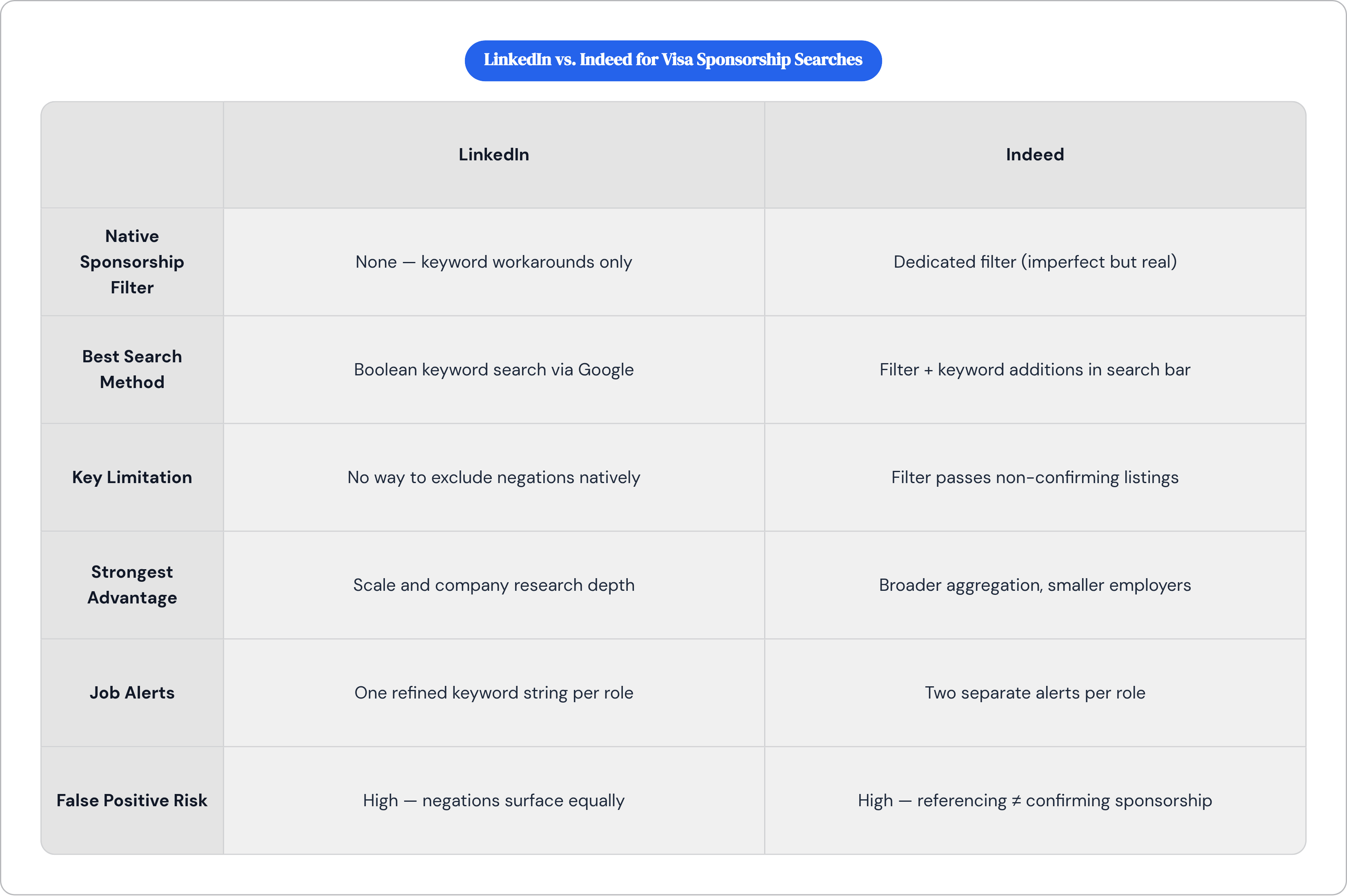
The goal is not to choose between LinkedIn and Indeed but to use both for what each does well and compensate for what each does poorly.
LinkedIn's advantages are scale and company research infrastructure. Its Boolean-refined keyword search, run through Google to exclude negatives, is the most effective method for finding sponsorship-relevant listings across a large volume of postings. Indeed's advantages are aggregation breadth, particularly for smaller employers and non-tech sectors, and its native sponsorship filter, imperfect as it is. Sorting Indeed results by date captures listings before competition accumulates.
Step one. Run a keyword-refined Boolean search on LinkedIn via Google using the query structures covered earlier. Layer standard filters on top: location, experience level, job type. Save the refined query string.
Step two. Run a parallel search on Indeed with the sponsorship filter applied, sorted newest first, using keyword additions in the search bar. Read the text of each result that passes the filter. Filter inclusion is not confirmation.
Step three. For each employer that looks credible from either platform, run a check using a third-party USCIS sponsorship database before applying. This step is not optional; it is the only way to distinguish employers who have actually sponsored from employers who have merely written that they do.
Step four. Set up job alerts on both platforms using refined keyword strings, not just job titles. On LinkedIn, alert on the Boolean-adjacent keyword combination. On Indeed, run two separate alerts per role.
Step five. Review alerts daily. Act quickly on postings that pass the employer history check, particularly on Indeed where application volume makes timing a meaningful variable.
One additional judgment call: when a listing mentions sponsorship but the employer has no USCIS history, that is not automatically disqualifying, especially for smaller or newer companies. It is, however, a flag worth addressing directly, either in the application or in a first contact message, rather than discovering the absence of sponsorship at the offer stage.
Platform filters are a starting point, not a verdict. The decision to invest application time should rest on employer history and posting text, not on whether a filter returned the listing.
What the H-1B approval data reveals about where to focus the search
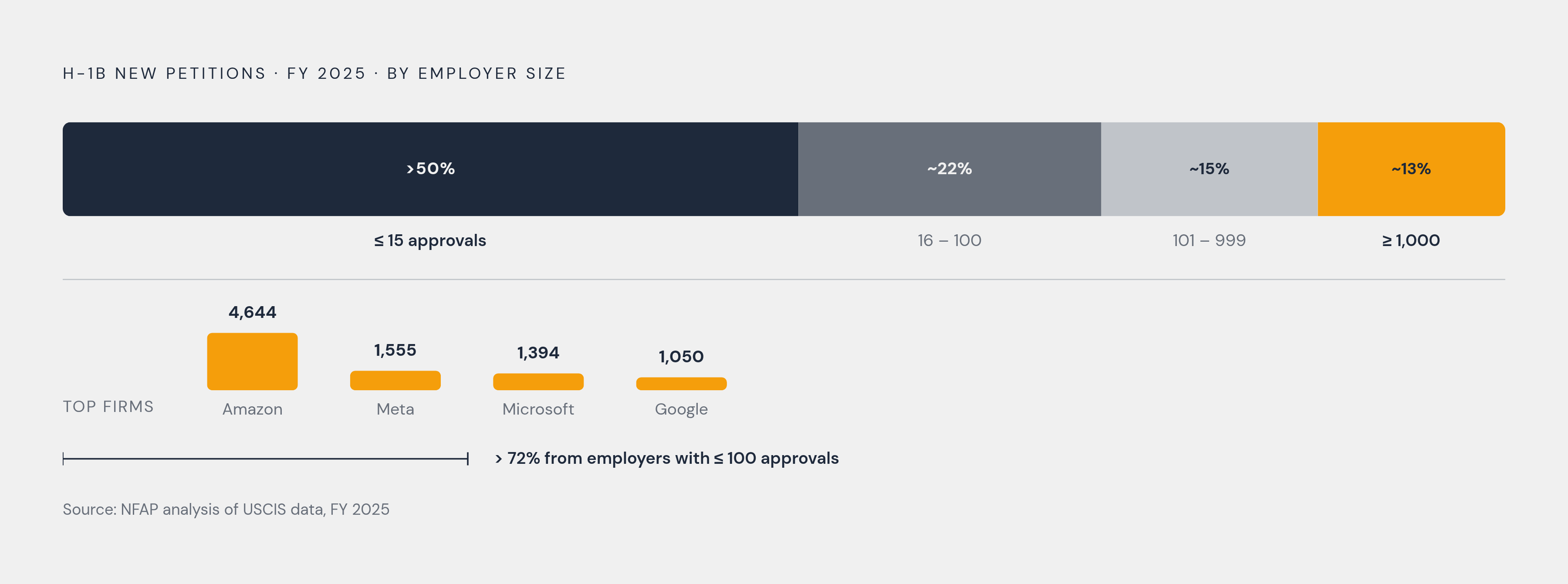
The finding that most reorients the search strategy: in FY 2025, more than 50% of new H-1B petitions went to employers with 15 or fewer approvals, and 72% went to employers with 100 or fewer, per NFAP analysis of USCIS data. The sponsorship market is not concentrated in a small set of large firms. It is distributed across thousands of employers, most of whom will never appear on a "top sponsors" list.
The mega-firm data provides useful context. In FY 2025, Amazon led with 4,644 approved H-1B petitions for initial employment, followed by Meta at 1,555, Microsoft at 1,394, and Google at 1,050. Notably, this marked the first time all four top spots went to U.S. technology companies. These are real numbers and real opportunities, but they represent a small fraction of total petition volume.
A search strategy optimized for large, well-known technology companies is targeting a minority of the available sponsorship market. The employers overlooked most frequently by candidates are the ones that require third-party verification tools to find at all, because they are not generating press coverage, they are not appearing in "top sponsors" roundups, and they are not always explicit about sponsorship in their postings.
Sectorally, Professional, Scientific, and Technical Services represented the largest share of H-1B new hires in FY 2025, but sponsorship extends well beyond technology into healthcare, finance, education, and research institutions. Geographic concentration of approvals skews toward major metropolitan areas, though remote work arrangements have broadened effective access to employers in markets that were previously impractical to target.
The adjustment this data demands is a reorientation away from brand recognition as a proxy for sponsorship likelihood. A company you have never heard of with a multi-year USCIS filing history and consistent approval rates is a more credible sponsorship prospect than a recognizable employer that has never filed a petition. Platform filters, on their own, cannot surface that distinction. The verification workflow can, and so can dedicated subscription job boards built around that data from the start, such as Migrate Mate, a visa-sponsorship job platform that lists verified US employers willing to sponsor and lets candidates filter by visa type before they ever apply.