USCIS Case Status Tracking and Alert Tools
Tools to track your USCIS case and know when to escalate.

Waiting on USCIS in 2025 is an exercise in structured uncertainty — like being handed a ticket at a deli counter where the number display is broken and the staff have taken a vow of silence. The agency's pending caseload hit 11.6 million cases in Q4 FY2025, more than triple what it was a decade ago, and USCIS will not call you when something changes. Every tool covered here exists because that absence of proactive outreach is, in fact, the default. Knowing which tools to use, in what order, and when to escalate is not a nicety: it is the only lever an applicant actually controls.
Your Receipt Number Does More Work Than You Think
Before any tool is useful, you need to understand what you are feeding into it. When USCIS receives your application, it issues a Receipt Notice, Form I-797, containing a 13-character receipt number. That string is the universal key for every tracking method covered below, official and otherwise.
The first three characters are not arbitrary. They identify the part of the USCIS infrastructure where your case entered the system: EAC for the Vermont Service Center, WAC for California, LIN for Nebraska, SRC for Texas, NBC for the National Benefits Center, MSC for the Missouri lockbox, and IOE for cases filed or processed through USCIS's Integrated Operating Environment.
The IOE prefix deserves specific attention. As USCIS has expanded electronic filing, IOE receipts have become increasingly common, and they come with a meaningful practical difference: cases carrying an IOE prefix, paired with an Online Access Code, unlock a richer set of features in the myUSCIS portal. More on that shortly.
One caveat that trips up a lot of applicants: the prefix no longer reliably predicts which physical office is actually adjudicating your file. USCIS routes cases across service centers based on staffing capacity, and processing times are now published under the umbrella label "Service Center Operations (SCOPS)" rather than by specific location. Your WAC prefix does not mean California is touching your case. It means California received it. These are different facts.
Find your receipt number on your I-797 before doing anything else. Everything downstream depends on it.
The Free Status Tool: Useful, and Limited
The USCIS Case Status Online tool lives at egov.uscis.gov. You enter your receipt number, and it returns the current status of your case. No account required for a single lookup. Simple enough.
What it actually shows: a status message such as "Case Was Received," "Request for Evidence Was Sent," "Case Was Approved," or "Card Was Mailed," along with case history when you are logged in.
The feature most applicants overlook: subscribing to email and text alerts. Once you create an account, Case Status Online will push a notification every time your status changes. This is the most basic form of passive monitoring USCIS offers, and it is free. Every applicant should use it.
The limitation is straightforward and worth stating plainly: status messages are coarse instruments. "Case Is Being Actively Reviewed" and "Case Was Received" can both persist for months without any meaningful distinction between them from the outside. The tool reflects what USCIS has recorded in its system, not what is actually happening in the adjudication queue. These are, unfortunately, also different things.
What a Full USCIS Account Actually Adds
The MyAccount portal at myaccount.uscis.gov is the full-featured version of what Case Status Online starts. It is free, device-agnostic, and secured with two-factor authentication. Once you link your cases, the dashboard surfaces receipt notices, biometrics appointments, interview schedules, and final decisions in a single view.
Paper filers are not excluded. Any receipt number can be added to an account under "Add a paper-filed case." The distinction that matters is whether your case has an IOE prefix and a corresponding Online Access Code: those cases unlock secure messaging with USCIS, the ability to view official notices, evidence upload, and online RFE response.
That last feature is consequential. Responding to a Request for Evidence through the portal is faster and more reliable than mailing a physical response, and it generates a timestamped electronic record. In a backlog environment where every day of processing delay has downstream consequences, the difference between a mailed response and an uploaded one is not trivial.
A reasonable expectation to calibrate from the start: the portal does not accelerate adjudication. It makes your response faster when USCIS acts, and it makes case management less chaotic. That is the actual value proposition, and it is sufficient.
The Processing Times Tool: One Number, Two Very Different Interpretations
The USCIS Processing Times tool is the most commonly misread instrument in the applicant toolkit, and the misreading carries real consequences.
Here is what the number actually represents: the time it took USCIS to complete 80% of adjudicated cases of a given form type over the prior six months. It is a historical completion rate for cases that were already finished. It is not a current queue estimate. It is not a prediction of when your case will be decided. The tool is updated monthly, but in a rapidly deteriorating backlog environment, like the conditions documented across Q1 and Q2 FY2025, the displayed figure can lag actual wait times by a substantial margin.
The more operationally important figure the tool provides is the inquiry date. This is the date after which USCIS considers your case outside normal processing times, tied to the 93rd-percentile threshold rather than the 80th. The inquiry date is what tells you when you are eligible to escalate formally. That is the number to track.
One additional change that has created confusion: per-service-center processing times have been consolidated under the SCOPS label. There is no longer a separate estimate for EAC versus LIN. Attempting to reverse-engineer your expected wait from your prefix will lead you astray. The tool does not support that inference anymore.
Use the processing times page for two things: understanding the general scale of your wait, and identifying the exact inquiry date for your form type. Nothing more.
How to Actually Flag a Stalled Case
Once the inquiry date shown in the processing times tool has passed, the official escalation channel is the Service Request Management Tool, known as SRMT, accessible through the USCIS website. The tool routes your request to the adjudicating office, where a reviewer examines the case and issues a response.
USCIS's stated internal goal is to resolve service requests within 15 business days of creation. In practice, responses typically arrive within 30 to 60 days. The responses themselves tend toward the bureaucratically inevitable: "Your case is pending review," "Background checks are ongoing," or the memorably uninformative "No further action is required at this time."
The hard limitation of a service request is worth stating without softening: it does not legally compel USCIS to adjudicate your case. It does not trigger a statutory deadline. It creates a record that you flagged the delay. That record can be useful if you eventually pursue mandamus litigation, but the service request itself changes nothing about the queue.
The timing constraint is real and non-negotiable. Submitting a service request before your inquiry date has passed typically results in an automatic rejection. Submit early on the theory that it can only help, and you will find that it cannot.
USCIS's virtual assistant, Emma, available via the "Ask Emma" button on uscis.gov, is useful for interpreting what a confusing status message means or for navigating to the right part of the website. It is not useful for expediting anything.
Premium Processing: What You Are Actually Buying
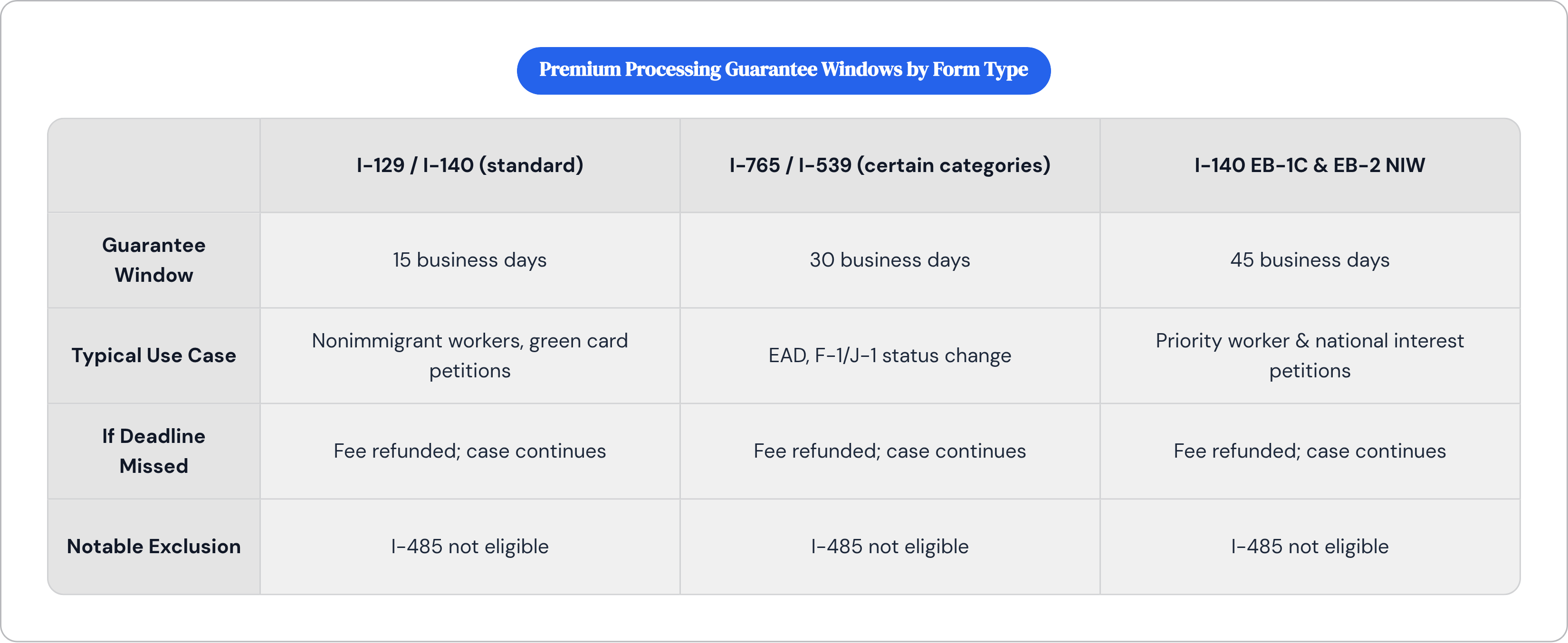
Premium processing is an additional government fee that purchases a guaranteed review timeline. The word "review" is doing significant work in that sentence.
As of 2026, the guarantee windows are as follows: 15 business days for most I-129 nonimmigrant worker petitions and I-140 green card petitions; 30 business days for I-765 EAD applications and I-539 requests for change of status to certain visa categories including F-1, J-1, and their dependents; and 45 business days for I-140 EB-1C and EB-2 National Interest Waiver petitions.
If USCIS misses the guaranteed window, it refunds the fee. The case does not jump a separate queue. There is no penalty to USCIS beyond the refund. The case continues.
The exclusion that frustrates the most applicants: I-485 adjustment of status is not eligible for premium processing. The form type with some of the longest current wait times, for which applicants often have the most pressing personal circumstances, has no paid fast-track option. That is the system as it exists.
For applicants where an I-765 or I-129 delay directly threatens work authorization, the calculation is often straightforward. Compressed OPT windows and H-1B start-date constraints make the premium processing fee a risk-mitigation cost rather than a luxury. USCIS raised premium processing fees effective March 1, 2026, under authority established by the USCIS Stabilization Act; confirm current amounts on uscis.gov before filing, because the figure in this article will eventually be wrong.
Third-Party Trackers: What They Automate and What They Cannot Touch
The structural gap that third-party tracking tools fill is specific: USCIS Case Status Online sends alerts when a status change is recorded, but it does not surface community timeline data, processing pattern trends, or Visa Bulletin updates. Third-party apps address that gap.
Case Tracker for USCIS & NVC (usciscasetracker.com) is among the more established options in this category, with over two million users reflected in its Google Play listing. It tracks all major receipt number prefixes, covers parole, humanitarian, employment visa, and green card case types, runs background polling with push notifications, and sends alerts when a new Visa Bulletin is released, which is directly relevant to employment-based and family-based green card applicants monitoring priority dates. It is available on both iOS and Android.
When evaluating any third-party tracker, a few questions are worth asking explicitly. Does it pull data directly from egov.uscis.gov, or does it maintain its own internal database? The former is more reliable by definition. How frequently does it poll for updates? Does it aggregate anonymized community timelines so you can compare your case progress against similar cases? And critically: what data does it collect, and how is it stored?
That last question matters. A receipt number, combined with other identifying information, can reveal an applicant's immigration status. Any tool that requests more than the receipt number itself warrants scrutiny. Prefer tools with explicit, readable privacy policies.
The ceiling on what any third-party tool can do is fixed and worth stating once: they have no channel to USCIS. They cannot communicate on your behalf, affect adjudication, or accelerate anything. They automate observation. That is a legitimate and useful function; it is simply a bounded one.
The Monitoring Routine Worth Actually Building
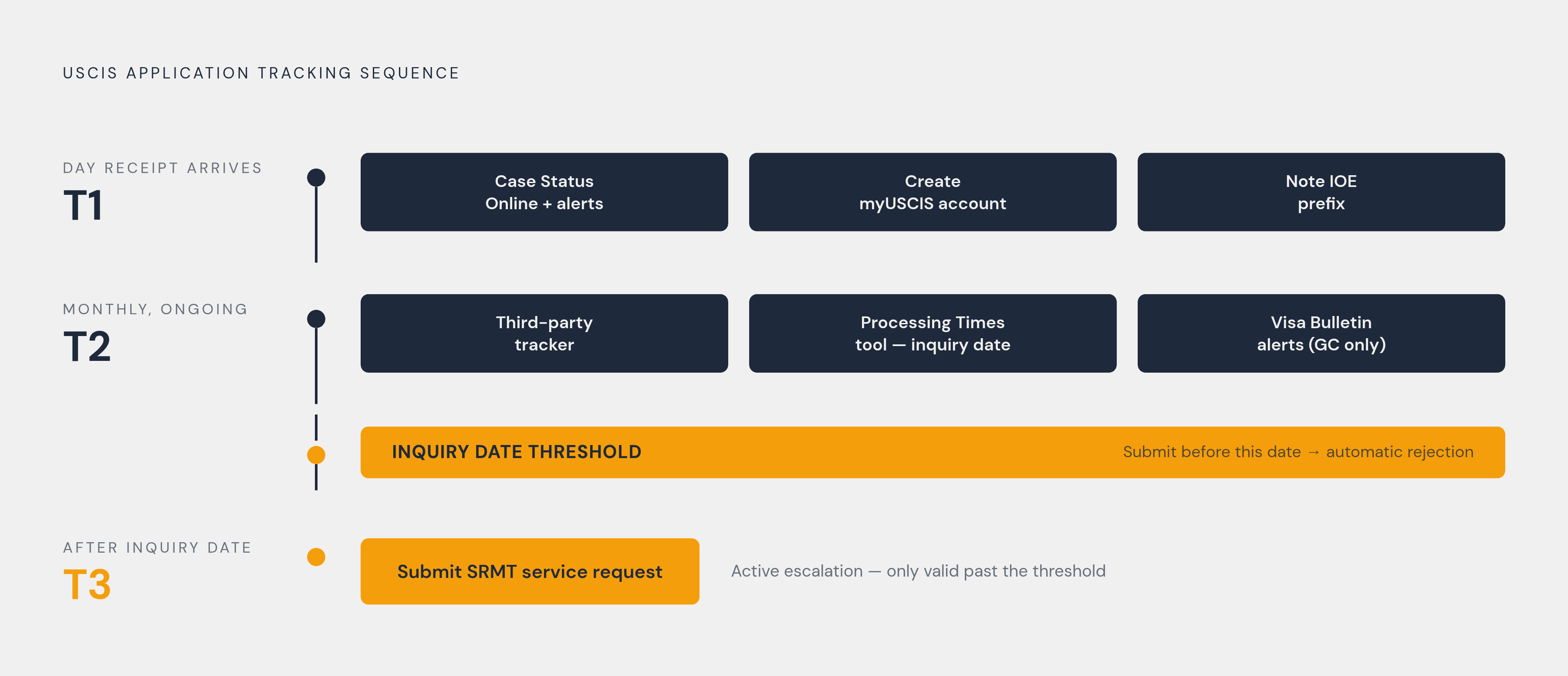
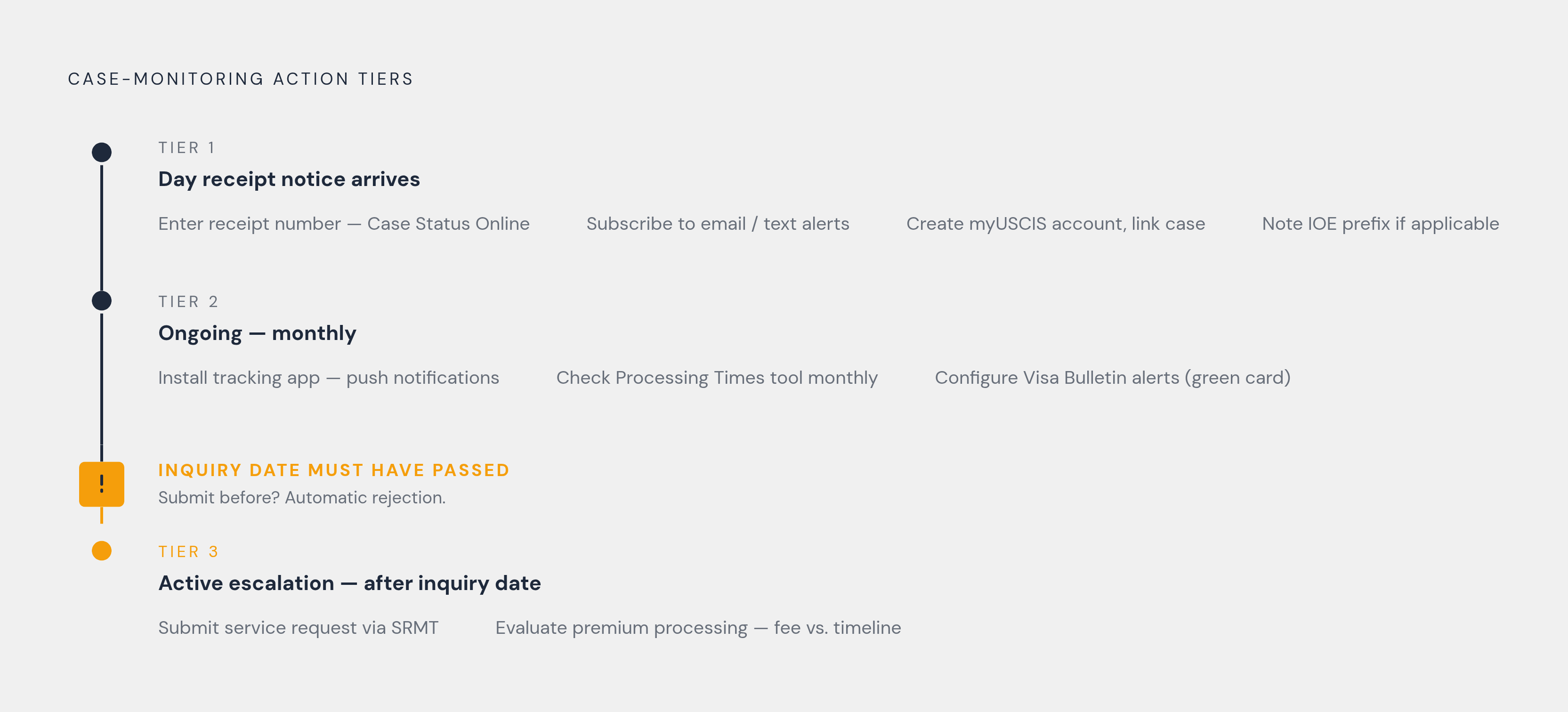
The practical framework here sorts into three tiers based on when each action is relevant, not how much effort it requires.
Tier 1: The Day Your Receipt Notice Arrives
Enter your receipt number in Case Status Online and subscribe to email and text alerts immediately. Create a myUSCIS account and link the case; if you have an IOE prefix and an Online Access Code, add it for the full feature set. Note your prefix and whether you have IOE access, because that determines what the portal can do for you going forward.
Tier 2: Ongoing Passive Monitoring
Install a third-party tracking app for push notifications and background polling so you are not manually checking the USCIS website. Pull up the USCIS Processing Times tool once a month and record two figures: the current processing time for your form type, and the inquiry date. If your case involves an employment-based or family-based green card, configure Visa Bulletin alerts, either through a third-party app or through USCIS's own notification option.
Tier 3: Active Escalation
Once the inquiry date has passed, submit a service request through SRMT. Submitting before then will result in an automatic rejection. If your form type is premium-processing eligible and you face acute timeline pressure, run the math on the current fee against the cost of compressed work authorization; check uscis.gov for the current fee before filing. For I-485 applicants and others whose form type has no premium processing option, the service request is the primary escalation tool, and mandamus litigation is the one beyond it, which is a topic for a different article.
The backlog that produced 5.4 million cases pending over six months as of April 2026, up from 3.6 million just a year prior, is not going to resolve itself on any timeline that aligns with individual applicants' visa clocks and job offers, including those still searching for sponsoring employers through subscription job boards that filter verified US companies by the visa types they have historically sponsored, and family circumstances. Think of it as a glacier moving through a city built on schedules: the ice does not consult anyone's calendar. The tools here will not fix that. They will, however, ensure you know exactly what is happening with your specific file at every point in the process, which turns out to be worth quite a lot when the alternative is silence.