USCIS Case Status Tracking Tools and Methods
Track your USCIS case with the right tool for each situation.

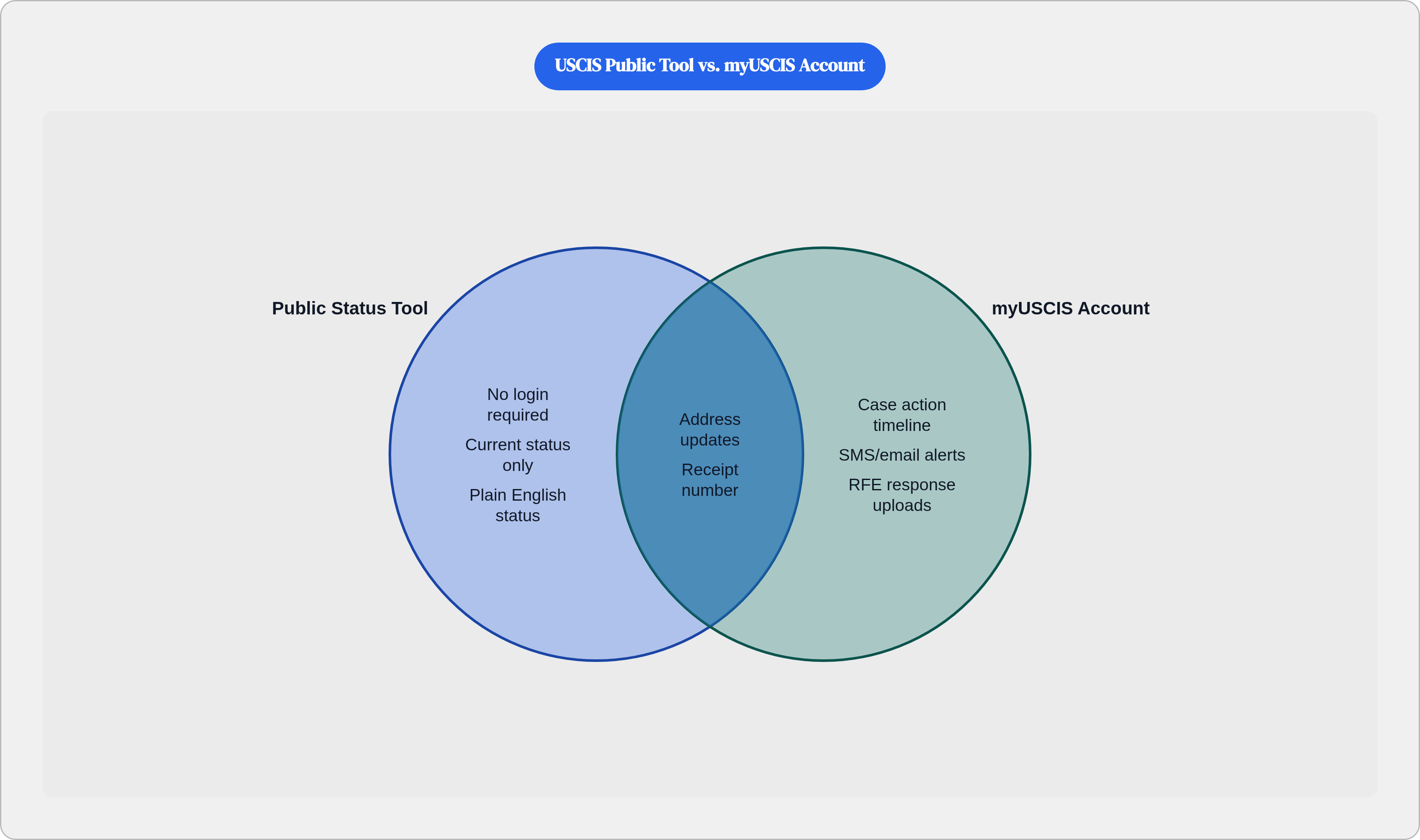
Drop a receipt number into egov.uscis.gov/casestatus and you get a current status, no login required. USCIS updates it within roughly a day of any processing activity, which makes it faster than the automated phone line and considerably faster than waiting for a mailed notice. What it returns is plain English: "Case Was Received," "Request for Evidence Was Sent," "Case Was Approved." No history, no timestamps, no breadcrumbs showing how the case got there.
That limitation is deliberate — the myUSCIS account exists precisely to fill it. The same portal also handles mailing address updates, e-Request submissions, and links to the processing times tool. For a quick sanity check, it's fine. For anything diagnostic, you're going to need more.
Before any of this is actionable, you need the 13-character receipt number from the Notice of Action, Form I-797. It starts with a three-letter service center code — EAC, WAC, LIN, SRC, NBC, MSC, or IOE — followed by a numeric sequence. Name, date of birth, A-number: none of that retrieves anything. Paper filers have to wait for the I-797 before tracking becomes possible; electronic filers get their receipt number sooner through their online account. That code also tells you which service center holds the case, which matters more than it sounds when you get to the processing times tool.
What the myUSCIS Online Account Adds and Why Linking a Paper-Filed Case Matters
The free account at myaccount.uscis.gov does what the public tool refuses to: it shows a timeline of case actions rather than just the current state, and it sends email or SMS alerts when something changes. For anyone managing concurrent filings — an I-485, I-765, and I-131 running in parallel, which is standard in family-based adjustment — the dashboard consolidates everything rather than forcing you to query each receipt number separately. Direct evidence uploads, RFE responses, biometrics rescheduling, and address updates all live here. Coverage isn't universal across every form type yet, but it's expanding.
Paper filers have one extra step: linking the receipt number to the account manually. Once that's done, the paper-filed case behaves like an electronic one. It's a five-minute task that most people don't know to do until they've already spent two weeks wondering why they're not getting alerts.
Reading the Processing Times Tool Correctly So a Wait Does Not Become a False Alarm
The processing times tool at egov.uscis.gov/processing-times runs on entirely different logic from the case status tool, and conflating the two is where most of the unnecessary panic originates. Data is broken out by form type and by specific field office or service center. The figure for your office and your form is the only one that matters.
The phrase "receipt date for a case inquiry" is where people lose the thread. That date marks the boundary before which USCIS considers a case overdue and eligible for a service request. If your receipt date falls after that date, your case is still within the posted window; a service request submitted then gets auto-declined.
One categorization error comes up often enough to be worth naming: applicants with I-485, N-400, or N-600 cases routed through the National Benefits Center checking NBC's posted times rather than their local field office. NBC is a routing hub. It transfers cases to field offices for interviews, so comparing your wait against NBC's timeline is like using a map of Chicago to navigate Detroit — same country, completely wrong streets.
USCIS also publishes a historic processing times dashboard showing national median timelines by form going back several years. That data is genuinely useful for assessing whether current waits are running longer than typical. The misread is treating any of those figures as a personal deadline rather than a statistical distribution, which they are.
Phone, Virtual Assistant, and Mobile App: What Each Channel Can and Cannot Resolve
The USCIS Contact Center is reachable at 1-800-375-5283 domestically, 212-620-3418 internationally, TTY 1-800-767-1833. Tier 1 agents see the same data the public tool shows. Calling to hear a status you already read on a screen accomplishes nothing except burning time on hold.
Tier 1 is worth the call in two situations: when a case can't be located with available information, or when an in-person appointment needs to be scheduled and no other path exists. Tier 2 agents, accessible through a Tier 1 referral, have access to internal notes that Tier 1 doesn't. If an e-Request has come back with nothing useful and a case has clearly stalled, pushing for a Tier 2 referral is a reasonable next move.
The virtual assistant Emma handles navigation and general FAQ questions and can hand off to a live agent; she cannot do anything meaningful with a specific case. The USCIS mobile app mirrors the case status tool with push notifications layered on. Neither adds information beyond the online account. In terms of update speed, the ranking runs: online account with alerts, then the public status tool, then the automated phone system, then mailed notices.
How to Use the e-Request System When a Case Has Crossed Outside Normal Processing Time
The Service Request Management Tool at egov.uscis.gov/e-request is the formal channel for submitting a service request directly to the adjudicating office. No attorney required, but eligibility is. The receipt date has to precede the "receipt date for a case inquiry" for that specific form and office, or the request gets declined automatically.
Four scenarios qualify: a case outside normal processing time, an expected notice or document not received, a typographical error on a USCIS-issued document, and non-delivery of an EAD, green card, or similar card. After submission, the request routes to the adjudicating office. Response windows vary and often run longer than USCIS's stated targets.
The responses that come back require some interpretive honesty. "Pending review" means queued with no action taken. "Background checks ongoing" means a specific hold exists with no resolution imminent. "No further action required" means USCIS considers the case within normal handling despite whatever elapsed time led you to file the request. An e-Request rarely accelerates anything, but it creates a formal record and occasionally surfaces a hold that had no prior visibility.
When a Congressional Inquiry Moves Faster Than an e-Request
When an e-Request returns something unsatisfying and the case is well past posted processing times, the next legitimate escalation is a congressional inquiry. The applicant contacts the constituent services office of their U.S. Senator or Representative directly. That office submits a formal inquiry through USCIS's Congressional Relations channel, which operates entirely separately from the public service request pipeline and is staffed by a dedicated liaison team.
USCIS is required to respond to congressional inquiries — a private service request carries no such compulsory force. Before a congressional office can act, the applicant signs a privacy release. That part is non-negotiable.
These inquiries gain traction when the delay is substantial and the circumstances are compelling: medical urgency, expiring status, dependent children aging toward cutoff dates. Both senators and the House representative for the applicant's district can file; using more than one office is common and not prohibited.
One option that used to sit between the e-Request and congressional inquiry in terms of institutional weight: the CIS Ombudsman. As of March 2025, DHS issued significant staff reductions to that office, substantially eroding its practical capacity as a case assistance channel. Anyone who relied on that escalation path before should recalibrate.
Third-Party Tracking Tools: What Community Data and Aggregator Platforms Are Actually Good For
Community platforms like Trackitt and VisaJourney run on self-reported data. Applicants log their own timelines, and the resulting picture is most useful for spotting patterns among people who filed around the same time in the same category. There's an inherent skew toward approvals, though: people who get decisions update their entries; people still waiting often don't. Apparent timelines on these platforms look shorter than the full distribution would suggest.
Aggregator tools cross-reference a case against a broader pool of USCIS records to show where nearby cases in the queue stand. Some parse USCIS's underlying JSON data, decode internal event codes into readable descriptions, and produce a stage-by-stage timeline that the official interface flattens into a single current status. The history isn't hidden in any technical sense; it's just formatted in a way the public tool doesn't surface. Whether that's a design philosophy or a policy choice is an interesting question that USCIS has never felt compelled to answer.
What none of these tools can reach: internal case notes, background check status, officer assignments. Their data is entirely derived from what USCIS exposes publicly. The honest use case for these platforms is answering whether a given wait looks unusual relative to comparable cases, which the official processing times tool only addresses in aggregate. Immigration law firm platforms that integrate directly with USCIS systems sometimes flag status changes before any consumer-facing channel delivers notification, so applicants working with attorneys find the attorney's platform is the fastest feed they have.
Tracking Physical Mail with USPS Informed Delivery When a Card or Document Is in Transit
After a green card or EAD is produced and mailed, USCIS provides a USPS tracking number through the online account or case status tool. USPS Informed Delivery, a free feature enrollable at USPS.com, sends daily email previews of incoming mail pieces including an envelope scan before the piece arrives. It also creates a paper trail if the card goes missing, which matters because replacing a lost card is its own ordeal.
If a card shows as delivered but doesn't appear, or if the case status indicates a mailing but no tracking number surfaces, that falls into the fourth qualifying scenario for the e-Request system: non-delivery of a USCIS-issued card. That's the correct channel; calling the Contact Center to report it first is a slower path to the same outcome.
The SAVE CaseCheck Portal and When an Applicant Needs to Use It
SAVE, the Systematic Alien Verification for Entitlements program, is not an application tracker. It is the mechanism government agencies use to verify immigration status before issuing benefits or licenses. The CaseCheck portal lets applicants run their own SAVE inquiry using their document number and date of birth, returning the same result a requesting agency would see.
This becomes relevant when a DMV, benefits office, or licensing board tells an applicant their status couldn't be verified. CaseCheck shows whether the verification came back pending or whether a response was already transmitted. The process begins with an automated database comparison; cases that don't resolve automatically proceed to manual verification steps, which take longer.
As of April 2025, the program eliminated fees for state, local, tribal, and territorial agencies, which is accelerating adoption. More agencies using SAVE means more applicants encountering SAVE-related delays in contexts that have nothing to do with their underlying USCIS application. A delay in one system does not indicate a delay in the other. They run in parallel and require separate inquiries to diagnose.